


1. 排错
这个主题的封面图在一个单独的文件夹/home/naseele/blog/WP/wordpress/wp-content/uploads/iro_gallery/,从后台-iro主题设置-主页设置-封面设置可以看到
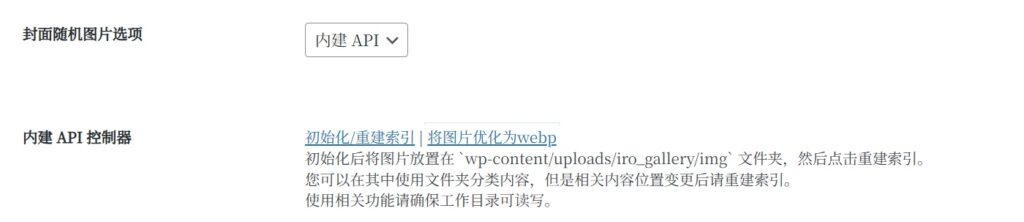
初次使用的时候图片优化和索引都没问题,但是后来我再怎么上传图片,怎么点重建索引和优化都没用,删掉索引文件重建也没用,索引文件里面明明白白有我新上传的图。扒拉了一圈日志也没见报错,不过看到了两个警告:
建立索引的时候:
成功建立索引。
Done! Warning: Cannot modify header information - headers already sent by (output started at /var/www/html/wp-content/themes/Sakurairo/functions.php:3933) in /var/www/html/wp-includes/functions.php on line 7170 Warning: Cannot modify header information - headers already sent by (output started at /var/www/html/wp-content/themes/Sakurairo/functions.php:3933) in /var/www/html/wp-includes/functions.php on line 7146;优化图片的时候:
所有图片一被压缩为webp格式。原图已备份至”backup“文件夹
请在重建索引前进行确认。
Done! Warning: Cannot modify header information - headers already sent by (output started at /var/www/html/wp-content/themes/Sakurairo/functions.php:3940) in /var/www/html/wp-includes/functions.php on line 7170 Warning: Cannot modify header information - headers already sent by (output started at /var/www/html/wp-content/themes/Sakurairo/functions.php:3940) in /var/www/html/wp-includes/functions.php on line 7146我第一反应是,我是不是上传图片忘了改权限了,去检查了一下我传的图:
sudo ls -lha /home/naseele/blog/WP/wordpress/wp-content/uploads/iro_gallery/img/确定图片所有者是www-data没错,甚至还不放心,在容器里又看了一遍:
docker exec -it wordpress ls -lha /var/www/html/wp-content/uploads/iro_gallery/img确实不是权限问题,那看看是不是处理用的工具缺失了?
进入容器检查 GD 库信息:
docker exec -it wordpress php -r "print_r(gd_info());"得到输出:
Array
(
    [GD Version] => bundled (2.1.0 compatible)
    [FreeType Support] => 1
    [FreeType Linkage] => with freetype
    [GIF Read Support] => 1
    [GIF Create Support] => 1
    [JPEG Support] => 1
    [PNG Support] => 1
    [WBMP Support] => 1
    [XPM Support] =>
    [XBM Support] => 1
    [WebP Support] => 1
    [BMP Support] => 1
    [AVIF Support] => 1
    [TGA Read Support] => 1
    [JIS-mapped Japanese Font Support] =>
)2. 检查并修复functions.php
那就只能是他程序写的有问题了,让我看看那个functions.php怎么个事儿。
找到/wp-content/themes/Sakurairo/functions.php,看看他的3933和3940行是什么:
docker exec -it wordpress sed -n '3930,3945p' /var/www/html/wp-content/themes/Sakurairo/functions.php可以看到:
        case 'gallery_init':
            include_once('inc/classes/gallery.php');
            $gallery = new Sakura\API\gallery();
            echo $gallery->init();
            echo 'Done!';
            break;

        case 'gallery_webp':
            include_once('inc/classes/gallery.php');
            $gallery = new Sakura\API\gallery();
            echo $gallery->webp();
            echo 'Done!';
            break;

        case 'del_exist_theme':
            $current_theme_folder = basename(get_template_directory());
if ($current_theme_folder != 'Sakurairo') {看来那个Headers already sent警告是这么来的,在输出文字("Done!")后 WordPress 继续运行并发送 HTTP 头。而HTTP 协议规定,一旦有任何内容被打印(echo),Header就不能再被修改了。
我们把第7行和第14行的break;改成exit;
改完记得确认一下文件所有者,以免出现权限错误。
如果直接修改感觉有危险,可以先备份再修改
# 1. 创建备份目录(如果不存在)
mkdir -p /home/naseele/back

# 2. 从容器中复制文件出来备份
docker cp wordpress:/var/www/html/wp-content/themes/Sakurairo/functions.php /home/naseele/back/functions.php.bak

# 3. 确认备份成功
ls -lh /home/naseele/back/functions.php.bak然后再修改
# 复制一份用于修改
cp /home/naseele/back/functions.php.bak /home/naseele/back/functions.php.new
# 编辑文件
nano /home/naseele/back/functions.php.new改完覆盖回去
docker cp /home/naseele/back/functions.php.new wordpress:/var/www/html/wp-content/themes/Sakurairo/functions.php记得改权限
sudo chown -R 33:33 /home/naseele/blog/WP/wordpress/wp-content/themes/Sakurairo/3. 修复图片处理逻辑
3.1 错误排查
刚才改那个只是让报错没了,而他处理图片的逻辑好像不太对,我们再看看处理图片的逻辑文件/var/www/html/wp-content/themes/Sakurairo/inc/classes/gallery.php(容器内路径)
看了看他的文件内容
docker exec -it wordpresscat /var/www/html/wp-content/themes/Sakurairo/inc/classes/gallery.phpgallery.php
<?php

// 内建随机图api
// 工作目录在wp-content/uploads/iro_gallery

namespace Sakura\API;

class gallery
{
    private $image_dir;
    private $image_list;
    private $image_folder;
    private $backup_folder;
    private $log = '';

    //定义工作目录
    public function __construct() {
        $upload_dir = wp_get_upload_dir()['basedir'];
        $this->image_dir = $upload_dir . '/iro_gallery';
        $this->image_list = $this->image_dir . '/imglist.json';
        $this->image_folder = $this->image_dir . '/img';
        $this->backup_folder = $this->image_dir . '/backup';
        //创建目录和索引
        $this->init_dirs();
    }

    private function init_dirs() {
        //初始化工作目录
        $dirs = [$this->image_dir, $this->image_folder, $this->backup_folder];

        foreach ($dirs as $dir) {
            if (!is_dir($dir) && !mkdir($dir, 0755, true)) {
                $this->log .= __("Unable to create directory: $dir. Please check permissions.", "sakurairo") . '<br>';
                return $this->log;
            }
        }
        //初始化索引
        if (!file_exists($this->image_list)) {
            if (!touch($this->image_list)) {
                $this->log .= __("Unable to create file: {$this->image_list}. Please check permissions.", "sakurairo") . '<br>';
                return $this->log;
            }
        }
    }

    //生成索引并进行分拣
    public function init() {
        $allowedExtensions = ['jpg', 'jpeg', 'bmp', 'png', 'webp', 'gif'];
        $imageFiles = ['long' => [], 'wide' => []];

        $allFiles = $this->get_all_files($this->image_folder);

        foreach ($allFiles as $filePath) {
            if (in_array(strtolower(pathinfo($filePath, PATHINFO_EXTENSION)), $allowedExtensions)) {
                //获取图片信息进行分拣
                $imageSize = @getimagesize($filePath);

                if ($imageSize === false) {
                    continue;
                }

                $width = $imageSize[0];
                $height = $imageSize[1];

                $filePath = str_replace($this->image_folder, '/iro_gallery/img', $filePath);

                //根据比例分拣图片
                if ($width / $height < 9 / 10) {
                    $imageFiles['long'][] = $filePath;
                } else {
                    $imageFiles['wide'][] = $filePath;
                }
            }
        }

        //保存索引
        file_put_contents($this->image_list, json_encode($imageFiles));

        $this->log .= __("Successfully initialized the index.", "sakurairo") . '<br>';
        return $this->log;
    }

    //遍历目录方法
    private function get_all_files($directory) {
        $result = [];
        $files = scandir($directory);

        foreach ($files as $file) {
            if ($file === '.' || $file === '..') {
                continue;
            }

            $filePath = $directory . '/' . $file;
            if (is_dir($filePath)) {
                $result = array_merge($result, $this->get_all_files($filePath));
            } else {
                $result[] = $filePath;
            }
        }

        return $result;
    }

    //webp优化步骤
    public function webp() {
        $this->log = '';
        $allowedExtensions = ['jpg', 'jpeg', 'png', 'webp', 'gif'];

        //检查backup目录是否有内容
        if (!is_dir($this->backup_folder) || count(scandir($this->backup_folder)) <= 2) {
            //没有则执行备份步骤
            if (!rename($this->image_folder, $this->backup_folder)) {
                $this->log .= __("The target directory is not accessible. Please check the permission settings.", "sakurairo") . '<br>';
                return $this->log;
            }
            if (!mkdir($this->image_folder, 0755, true)) {
                $this->log .= __("The target directory is not accessible. Please check the permission settings.", "sakurairo") . '<br>';
                return $this->log;
            }
            $this->log .= __("Successfully backed up images from the 'img' folder to the 'backup' folder.", "sakurairo") . '<br>';
        } else {
            $this->log .= __("Detected content in the 'backup' folder. Verifying and attempting to restore conversion operations.", "sakurairo") . '<br>';
        }

        $allFiles = $this->get_all_files($this->backup_folder);

        foreach ($allFiles as $backupPath) {
            if (!in_array(strtolower(pathinfo($backupPath, PATHINFO_EXTENSION)), $allowedExtensions)) {
                continue;
            }

            //生成 WebP 文件的相对路径和目标路径
            $relativePath = str_replace($this->backup_folder . '/', '', $backupPath);  //相对路径
            $pathInfo = pathinfo($relativePath);
            $webpPath = $this->image_folder . '/' . $pathInfo['dirname'] . '/' . $pathInfo['filename'] . '.webp';

            //跳过已存在的WebP文件(从上个断点继续转换)
            if (file_exists($webpPath)) {
                $this->log .= __("Skipped file: {$relativePath}, a webp image with the same name already exists.", "sakurairo") . '<br>';
                continue;
            }

            //确保目标子目录存在
            $targetDir = dirname($webpPath);
            if (!is_dir($targetDir)) {
                mkdir($targetDir, 0755, true);
            }

            //转换文件
            $this->convert_to_webp($backupPath, $webpPath);
        }

        $this->log .= __("All images have been compressed to WebP format. The original files are stored in the 'backup' folder.<br> Please confirm correctness before reinitializing the index.<br>", "sakurairo") . '<br>';

        return $this->log;
    }

    //webp优化方法
    private function convert_to_webp($source, $webpPath) {
        $extension = strtolower(pathinfo($source, PATHINFO_EXTENSION));

        switch ($extension) {
            case 'jpg':
            case 'jpeg':
                $image = imagecreatefromjpeg($source);
                break;
            case 'png':
                $image = imagecreatefrompng($source);
                break;
            case 'gif':
                $image = imagecreatefromgif($source);
                break;
            case 'webp':
                $image = imagecreatefromwebp($source);
                break;
            default:
                $this->log .= __("Unsupported file type: $source .", "sakurairo") . '<br>';
        }

        if ($image) {
            imagewebp($image, $webpPath, 80);
            imagedestroy($image);
            $this->log .= __("Successfully converted to WebP: $source .", "sakurairo") . '<br>';
            return $this->log;
        } else {
            $this->log .= __("Failed to convert file: $source .", "sakurairo") . '<br>';
            return $this->log;
        }
    }

    //获取图片
    public function get_image() {
        $imgParam = isset($_GET['img']) ? sanitize_text_field($_GET['img']) : '';
        $imageList = json_decode(file_get_contents($this->image_list), true);

        if (empty($imageList)) {
            $this->init(true);
        }

        $error_info = array(
            'status' => 500,
            "success" => false,
            'message' => __("No images found. Please contact the administrator to check if images exist in the 'iro_gallary' directory and ensure the directory is readable and writable.", "sakurairo") . '<br>',
        );
        $error = new \WP_REST_Response($error_info, 500);
        $error->set_status(500);

        if (!empty($imageList)) {
            //img参数优先获取long或wide
            if ($imgParam == 'l' && !empty($imageList['long'])) {
                $random_image = $imageList['long'][array_rand($imageList['long'])];
            } else {
                if ($imgParam == 'w' && !empty($imageList['wide'])) {
                    $random_image = $imageList['wide'][array_rand($imageList['wide'])];
                } else {
                    $all_images = array_merge($imageList['long'] ?? [], $imageList['wide'] ?? []);
                    if (!empty($all_images)) {
                        $random_image = $all_images[array_rand($all_images)];
                    } else {
                        return $error;
                    }
                }
            }

            $random_image = wp_get_upload_dir()['baseurl'] . $random_image;

            wp_redirect($random_image, 302);
            exit;
        } else {
            return $error;
        }
    }
}
?>看了之后大受震撼,这里有两个大问题:
首先是逻辑死穴: 这段代码的设计逻辑是一次性迁移,而非 “持续优化”。
- 首先是代码第110行:
if (!is_dir($this->backup_folder) || count(scandir($this->backup_folder)) <= 2)。它的逻辑是:只有当 backup 文件夹是空的时候,它才会把 img文件夹里的原图移进去。而我们现在已经第执行过一次图片优化,backup 文件夹里已经有老图了。所以脚本运行到这里,判断backup文件夹不为空,直接跳过了移动新图片到backup文件夹的步骤。但是文档明明写的是“初始化后将图片放置在 `wp-content/uploads/iro_gallery/img` 文件夹,然后点击重建索引。”好怪,改一下吧……
- 然后是第126行:它开始遍历 backup 文件夹进行转换。但我们的新图片还在 img 文件夹里傻等着呢,它根本不看
img文件夹……
其次(这一点我没看出来,毕竟php我不熟,gemini 3.0 pro复盘的时候给我指出来了,还提了优化建议)这样写还有性能隐患: 代码第 164-180行 使用的是 PHP 自带的 imagecreatefromjpeg 等函数:
- 这非常消耗内存。处理一张 4K 图片可能瞬间耗尽 Docker 容器默认分配的 PHP 内存(通常 128MB),导致脚本静默中断。
- 建议安装并使用 cwebp 工具,它的效率要高 100 倍,而且不会爆内存。
3.2 修复
3.2.1 安装cwebp
那我们先搞一个cwebp吧。
先找个地方放,我放到/home/naseele/bin了。
mkdir -p /home/naseele/bin
cd /home/naseele/bin

# 下载预编译好的 webp 工具 (Google 官方提供的 Linux 版)
wget https://storage.googleapis.com/downloads.webmproject.org/releases/webp/libwebp-1.3.2-linux-x86-64.tar.gz

# 解压
tar -xzf libwebp-1.3.2-linux-x86-64.tar.gz

# 把 cwebp 拿出来
mv libwebp-1.3.2-linux-x86-64/bin/cwebp .

# 给执行权限
chmod +x cwebp

# 清理垃圾(清理前请确保名字正确,建议别用这个通配符而是手动删掉压缩包和解压出来的文件夹)
# 只保留我们单独拎出来的cwebp即可
rm -rf libwebp-1.3.2-linux-x86-64*修改我们的docker-compose.yml,找到 wordpress 服务部分,在 volumes 下面加一行映射,把cwebp所在的路径映射进去:
services:
  wordpress:
    # ... 其他配置不变 ...
    volumes:
      - ./wordpress:/var/www/html
      # ... 其他映射 ...
      # 【新增这一行】把宿主机的 cwebp 直接映射到容器的 /usr/bin/cwebp
- /home/naseele/bin/cwebp:/usr/bin/cwebp注意缩进,不要搞错了!
3.2.2 覆写图片处理逻辑
然后改一下 gallery.php 文件,把逻辑改成:
// 旧代码思维:
如果 (backup文件夹是空的) {
    把 img 里的图移到 backup;
} 否则 {
    // 认为“由于 backup 不为空,说明之前已经移动过了”
    // 于是直接开始转换 backup 里的图,完全不看 img 里有没有新图!
}

// 我们修改后的思维:
不管 backup 空不空,先去 img 里巡逻一遍;
如果 (img 里有新 jpg/png) {
    把它搬到 backup 去; // 确保新图入库
}
然后遍历 backup,把还没转成 webp 的图转出来。新建一个名为gallery_new.php的文件,然后写入以下内容(请自行展开查看)
gallery_new.php
<?php

// 内建随机图api
// 工作目录在wp-content/uploads/iro_gallery

namespace Sakura\API;

class gallery
{
    private $image_dir;
    private $image_list;
    private $image_folder;
    private $backup_folder;
    private $log = '';

    //定义工作目录
    public function __construct() {
        $upload_dir = wp_get_upload_dir()['basedir'];
        $this->image_dir = $upload_dir . '/iro_gallery';
        $this->image_list = $this->image_dir . '/imglist.json';
        $this->image_folder = $this->image_dir . '/img';
        $this->backup_folder = $this->image_dir . '/backup';
        //创建目录和索引
        $this->init_dirs();
    }

    private function init_dirs() {
        //初始化工作目录
        $dirs = [$this->image_dir, $this->image_folder, $this->backup_folder];

        foreach ($dirs as $dir) {
            if (!is_dir($dir) && !mkdir($dir, 0755, true)) {
                $this->log .= __("Unable to create directory: $dir. Please check permissions.", "sakurairo") . '<br>';
                return $this->log;
            }
        }
        //初始化索引
        if (!file_exists($this->image_list)) {
            if (!touch($this->image_list)) {
                $this->log .= __("Unable to create file: {$this->image_list}. Please check permissions.", "sakurairo") . '<br>';
                return $this->log;
            }
        }
    }

    //生成索引并进行分拣
    public function init() {
        $allowedExtensions = ['jpg', 'jpeg', 'bmp', 'png', 'webp', 'gif'];
        $imageFiles = ['long' => [], 'wide' => []];

        $allFiles = $this->get_all_files($this->image_folder);

        foreach ($allFiles as $filePath) {
            if (in_array(strtolower(pathinfo($filePath, PATHINFO_EXTENSION)), $allowedExtensions)) {
                //获取图片信息进行分拣
                $imageSize = @getimagesize($filePath);

                if ($imageSize === false) {
                    continue;
                }

                $width = $imageSize[0];
                $height = $imageSize[1];

                $filePath = str_replace($this->image_folder, '/iro_gallery/img', $filePath);

                //根据比例分拣图片
                if ($width / $height < 9 / 10) {
                    $imageFiles['long'][] = $filePath;
                } else {
                    $imageFiles['wide'][] = $filePath;
                }
            }
        }

        //保存索引
        file_put_contents($this->image_list, json_encode($imageFiles));

        $this->log .= __("Successfully initialized the index.", "sakurairo") . '<br>';
        return $this->log;
    }

    //遍历目录方法
    private function get_all_files($directory) {
        $result = [];
        $files = scandir($directory);

        foreach ($files as $file) {
            if ($file === '.' || $file === '..') {
                continue;
            }

            $filePath = $directory . '/' . $file;
            if (is_dir($filePath)) {
                $result = array_merge($result, $this->get_all_files($filePath));
            } else {
                $result[] = $filePath;
            }
        }

        return $result;
    }

    //webp优化步骤
    public function webp() {
        $this->log = '';
        $allowedExtensions = ['jpg', 'jpeg', 'png', 'gif']; // 原图格式,不需要webp

        // 【修改1】 增加主动扫描 img 目录逻辑,把新上传的图片移动到 backup
        $newFiles = $this->get_all_files($this->image_folder);
        $moved_count = 0;

        foreach ($newFiles as $newFile) {
            $ext = strtolower(pathinfo($newFile, PATHINFO_EXTENSION));
            // 如果是原图格式 (不是webp)
            if (in_array($ext, $allowedExtensions)) {
                // 计算相对路径,保持目录结构
                $relativePath = str_replace($this->image_folder . '/', '', $newFile);
                $targetBackupPath = $this->backup_folder . '/' . $relativePath;

                // 确保 backup 中的子目录存在
                $targetBackupDir = dirname($targetBackupPath);
                if (!is_dir($targetBackupDir)) {
                    mkdir($targetBackupDir, 0755, true);
                }

                // 移动文件
                if (rename($newFile, $targetBackupPath)) {
                    $moved_count++;
                }
            }
        }

        if ($moved_count > 0) {
            $this->log .= "Moved $moved_count new images from 'img' to 'backup'.<br>";
        }

        // 开始处理 backup 目录
        $allFiles = $this->get_all_files($this->backup_folder);

        foreach ($allFiles as $backupPath) {
            if (!in_array(strtolower(pathinfo($backupPath, PATHINFO_EXTENSION)), $allowedExtensions)) {
                continue;
            }

            //生成 WebP 文件的相对路径和目标路径
            $relativePath = str_replace($this->backup_folder . '/', '', $backupPath);  //相对路径
            $pathInfo = pathinfo($relativePath);
            $webpPath = $this->image_folder . '/' . $pathInfo['dirname'] . '/' . $pathInfo['filename'] . '.webp';

            //跳过已存在的WebP文件(从上个断点继续转换)
            if (file_exists($webpPath)) {
                // $this->log .= __("Skipped file: {$relativePath}, a webp image with the same name already exists.", "sakurairo") . '<br>';
                continue;
            }

            //确保目标子目录存在
            $targetDir = dirname($webpPath);
            if (!is_dir($targetDir)) {
                mkdir($targetDir, 0755, true);
            }

            //转换文件
            $this->convert_to_webp($backupPath, $webpPath);
        }

        $this->log .= __("All images have been compressed to WebP format. The original files are stored in the 'backup' folder.<br> Please confirm correctness before reinitializing the index.<br>", "sakurairo") . '<br>';

        return $this->log;
    }

    //webp优化方法
    private function convert_to_webp($source, $webpPath) {
        // 【修改2】 使用 cwebp 命令行工具,效率更高,支持 4K
        // 使用 escapeshellarg 防止文件名中的空格导致命令失效
        $cmd = "cwebp -q 75 " . escapeshellarg($source) . " -o " . escapeshellarg($webpPath) . " 2>&1";

        $output = [];
        $return_var = 0;
        exec($cmd, $output, $return_var);

        if ($return_var === 0) {
            $this->log .= __("Successfully converted to WebP: $source .", "sakurairo") . '<br>';
            return $this->log;
        } else {
            // 如果 cwebp 失败 (比如不是受支持的图片),尝试降级回 PHP 处理 (或者直接报错)
            $this->log .= __("Failed to convert file (cwebp error): $source .", "sakurairo") . '<br>';
            return $this->log;
        }
    }

    //获取图片
    public function get_image() {
        $imgParam = isset($_GET['img']) ? sanitize_text_field($_GET['img']) : '';
        $imageList = json_decode(file_get_contents($this->image_list), true);

        if (empty($imageList)) {
            $this->init(true);
        }

        $error_info = array(
            'status' => 500,
            'success' => false,
            'message' => __("No images found. Please contact the administrator to check if images exist in the 'iro_gallary' directory and ensure the directory is readable and writable.", "sakurairo") . '<br>',
        );
        $error = new \WP_REST_Response($error_info, 500);
        $error->set_status(500);

        if (!empty($imageList)) {
            //img参数优先获取long或wide
            if ($imgParam == 'l' && !empty($imageList['long'])) {
                $random_image = $imageList['long'][array_rand($imageList['long'])];
            } else {
                if ($imgParam == 'w' && !empty($imageList['wide'])) {
                    $random_image = $imageList['wide'][array_rand($imageList['wide'])];
                } else {
                    $all_images = array_merge($imageList['long'] ?? [], $imageList['wide'] ?? []);
                    if (!empty($all_images)) {
                        $random_image = $all_images[array_rand($all_images)];
                    } else {
                        return $error;
                    }
                }
            }

            $random_image = wp_get_upload_dir()['baseurl'] . $random_image;

            wp_redirect($random_image, 302);
            exit;
        } else {
            return $error;
        }
    }
}
?>之后覆盖容器内文件:
docker cp gallery_new.php wordpress:/var/www/html/wp-content/themes/Sakurairo/inc/classes/gallery.php记得改新文件的权限:
sudo chown -R 33:33 wordpress/wp-content/themes/Sakurairo/inc/classes/gallery.php3.2.3 重启容器
之后我们可以重启容器了:
cd 我们的docker-compose.yml所在路径
docker compose down
docker compose up -d 大功告成,可以手动测试一下,原图片正确的被移动到backup文件夹,压缩效果也很好。
4. 修改压缩质量(可选)
如果感觉压缩效果不满意,可以改压缩质量:
直接改那个gallery_new.php文件,找到倒数20行左右的convert_to_webp(nano可以使用ctrl+v快速到文件结尾,太长的文件可能要多敲几次,甚至是长按)
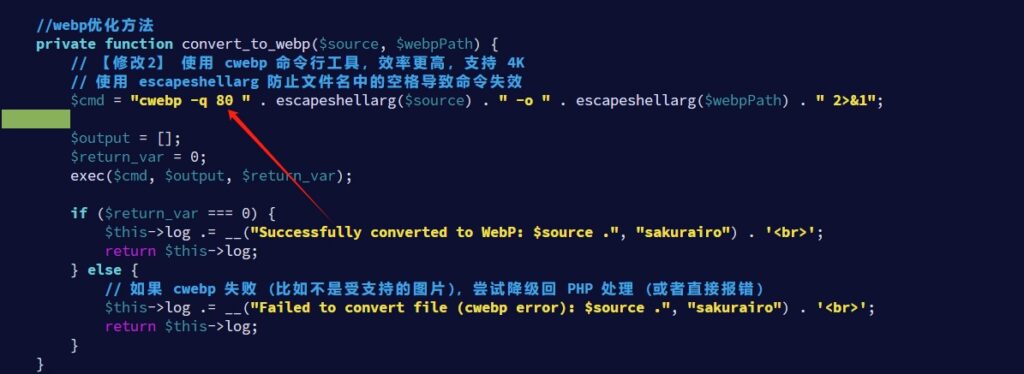
//webp优化方法
    private function convert_to_webp($source, $webpPath) {
        // 【修改这里】 把 -q 后面的 75 改成 80 或 85
        $cmd = "cwebp -q 75 " . escapeshellarg($source) . " -o " . escapeshellarg($webpPath) . " 2>&1";

// ...把75改成80或者85,看你个人需求。
之后覆盖回去
docker cp ~/b/WP/gallery_new.php wordpress:/var/www/html/wp-content/themes/Sakurairo/inc/classes/gallery.php修改文件权限:
docker exec wordpress chown -R www-data:www-data /var/www/html/wp-content/themes/Sakurairo/inc/classes/gallery.php5. 尾声
最后的最后,提醒一下
每次上传图片的时候记得执行一下:
docker exec wordpress chown -R www-data:www-data /var/www/html/wp-content/uploads/iro_gallery
Comments NOTHING